Prisma Client

適用於 TypeScript 和 Node.js 的直觀資料庫客戶端

Prisma Client 可在各種語言與資料庫之間無縫運作。透過編寫更少的 SQL 來加速開發,並利用專為您的應用程式量身打造的全面型別安全 API 來避免錯誤。

Prisma Client

探索
Prisma Client API

從簡單的讀取到複雜的巢狀寫入,Prisma Client 支援廣泛的操作,協助您充分利用您的資料。

開始使用
  • 搜尋記錄
  • 遍歷關聯
  • 排序、分頁與游標
  • 聚合與分組
1// Find all posts
2const allPosts: Post[] = await prisma.post.findMany()
1// Find a user by ID
2const userById: User | null = await prisma.user.findUnique({
3 where: {
4 id: 2,
5 },
6})
1// Find a user by email
2const userByEmail = await prisma.user.findUnique({
3 where: {
4 email: 'ada@prisma.io',
5 },
6})
1// Find the first user that contains Ada
2const userByName = await prisma.user.findFirst({
3 where: {
4 name: {
5 contains: 'Ada',
6 },
7 },
8})
1// Select specific fields
2const userName = await prisma.user.findUnique({
3 where: {
4 email: 'ada@prisma.io',
5 },
6 select: {
7 name: true,
8 email: true,
9 },
10})
編輯器整合

透過自動完成邁向成功

最好的程式碼就是會自動生成的程式碼。Prisma Client 提供絕佳的自動完成體驗,讓您能快速開發,並確保不會寫出無效的查詢。我們對型別安全的堅持,意味著您可以放心地確保程式碼每次都能如預期般運作。

5 分鐘快速上手
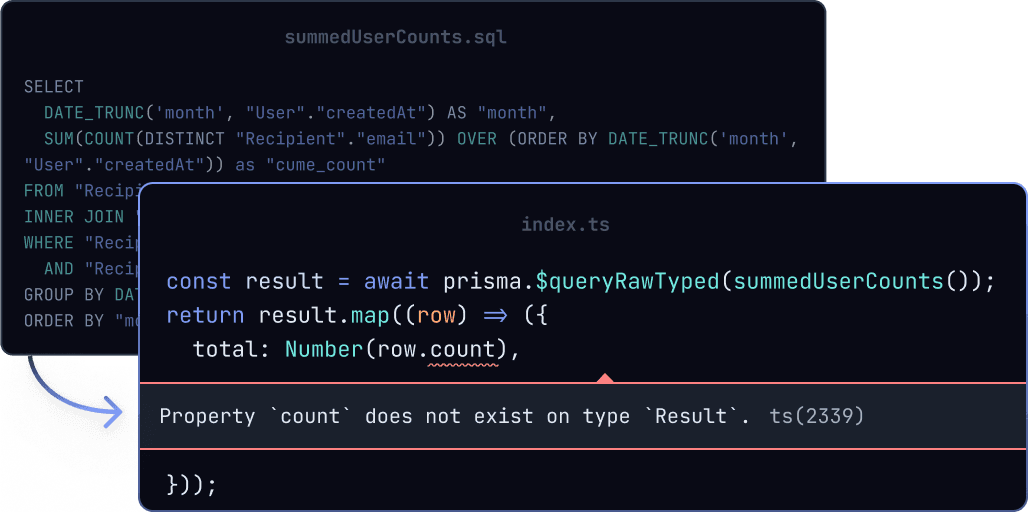
TypedSQL

完全型別安全的原始 SQL

直接對您的資料庫執行 SQL 查詢,同時保有 Prisma 型別檢查與自動完成的優勢。TypedSQL 利用 Prisma Client 的功能,編寫在編譯階段即可進行型別檢查的原始 SQL 查詢。

深入了解 TypedSQL

與您喜愛的資料庫及框架完美協作

支援的資料庫
PostgresSQLMySQLMariaDBSQLiteSQLServerCockroachDBPlanetscaleMongoDB
精選框架

Prisma 可輕鬆整合至您選擇的框架中,簡化資料庫存取流程、節省重複的 CRUD 樣板程式碼,並提升型別安全性。

ReactNext.jsNestJSApolloHapiGraphQLExpressRedwood

Prisma Studio

視覺化資料庫瀏覽器

Prisma Studio 是探索與操作 Prisma 專案資料最簡單的方式。透過瀏覽資料表、篩選、分頁、遍歷關聯以及安全地編輯資料,來深入理解您的資料。

深入了解 Prisma Studio

Prisma Migrate

無痛資料庫遷移

Prisma Migrate 可根據您的 Prisma schema 自動產生 SQL 遷移檔。這些遷移檔案完全可自訂,讓您擁有完全的控制權與極致的靈活性——從本地開發環境到正式營運環境皆適用。

探索 Prisma Migrate
© . This site is unofficial and not affiliated with Prisma Data, Inc.